April 6, 2026
·PostIntroducing Loop Extender
A scripting system for ralph loops
Agent orchestration and ralphing have taken the world by storm. Many startups are making bets on how agent orchestration should work—but the truth is that we don’t really know yet.
Months ago (decades in AI-years), Anthropic released an official Ralph plugin. However, many people found that using a traditional bash loop worked better.
While AI enthusiasts are working to invent agent orchestration tools with the best developer experience imaginable, a lot of us just want to quickly spin up custom workflows in the simplest way imaginable.
That’s why we created Loop Extender.
Basic Example
Loop Extender is simple. You give it a bash (or TS/JS) script and it runs it in a loop.
While traditional ralph loops look like this
Run command:
while :; do cat PROMPT.md | claude --dangerously-skip-permissions -p ; doneLoop Extender is a simple wrapper around a bash script that does the same thing.
Create file → .loopx/ralph/index.sh:
cat PROMPT.md | claude --dangerously-skip-permissions -pRun command:
loopx run ralphWhile this basic example seems a bit more complex than the traditional one-liner, this small amount of additional boilerplate allows the developer to create complex AI workflows with ease. Keep reading to find out how.
A Real Example
At Modular Cloud, we have a workflow which we will write about more in-depth at a later time. But for the sake of this example, the idea is that we have SPEC.md that lays out the spec for the project we are working on and TEST-SPEC.md which lays out the plan for the tests. We use GPT 5.4 Pro to review both files together holistically and Claude Code to apply the changes found in the review to the specs. Sometimes questions arise as a result of these reviews and we let Claude Code ask us to manually clarify the answers after we have fed in GPT 5.4 Pro’s feedback. We have found that looping this many times in a row greatly improves our specs and tests.
Although it is not too difficult to do manually, we wanted to automate this as much as possible. Furthermore, we wanted to utilize our ChatGPT Pro subscription, since it would be very expensive to run all of these queries through the OpenAI’s API.
Using Loop Extender, we created this workflow:
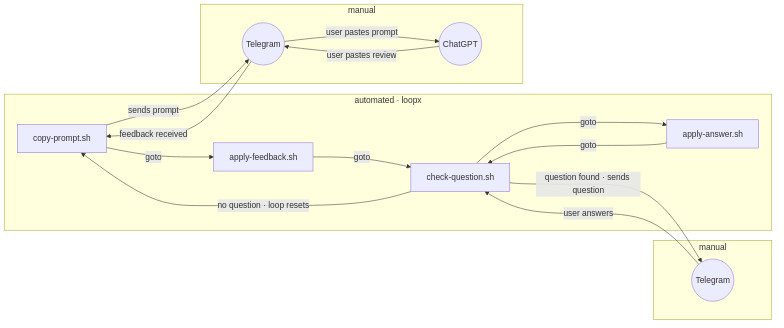
This provides us a phenomenal agent experience. By keeping this running, Loop Extender would sends us the prompt that we need to feed into the ChatGPT app. We copy and paste it from Telegram into ChatGPT on our phone—and then copy and paste ChatGPT’s response back into Telegram when it’s done (20-30 minutes later). Then it applies the feedback (which takes 10-15 minutes), chats with us on Telegram to clarify any questions it has, and starts another round of review when it is done.
This allows us to refine our specs while on-the-go with minimal effort.
Maybe this exact workflow is not for you. But Loop Extender can easily adapt to anything else that you want to do instead.
Usage
Loop Extender is open source and MIT licensed.
To get started install the CLI
npm install -g loop-extenderIf you want to fully understand how it works, you can read the comprehensive spec here. But honestly, don’t worry about it.
Instead, use the Claude Code plugin to generate your desired workflow. Open Claude Code and run this:
/plugin marketplace add modularcloud/loop-extender
/plugin install loopx@loop-extender
Or, if you prefer another agent harness like Codex, use skills.sh:
npx skills add modularcloud/loop-extenderThen invoke the skill (/loopx in Claude Code) and describe the flow you would like to build for you repo. This will create the scripts for you and install it in the .loopx directory in your project root.
What’s Next
We have been doing complex agent loops for a while and tried to come up with the simplest tool that could automate our work. But some of our initial assumptions were wrong and now that we have been dogfooding Loop Extender internally, we have a lot of changes planned.
What worked:
The core looping mechanism
Using skills to vibe orchestrate
Built-in environment variable management (for example, you can set your Telegram API key without committing it to your repo)
What we need to improve (update on April 17, 2026 - these are both done):
Workflow invocation UX could be better. Right now you run
loopx <script-name>but a better mental model isloopx <workflow-name>Remote script installation. You can run
loopx install <script-url>to clone a remote script into your .loopx directory. However, workflows typically contain multiple scripts—and we need a mechanism to download all of them in a bundle. Further, we need a setup mechanism that configures scripts to the specifics of your project and machine.
What we overlooked:
We didn’t put enough thought into optimizing parallelism.
We didn’t consider the importance of workflow visualization.
There are a few common primitives that are core to many workflows (such as messaging, temporary files, etc.) that we initially thought should just live inside of scripts but now are considering adding to Loop Extender’s core to prevent users from reinventing the wheel.
What we planned to add after the initial release:
Sandboxing
Remote sessions
Session state
Improved observability
Why this? Why now?
We aren’t an AI company. We are a blockchain company. But we heavily use AI in our development process.
In the coming weeks, we will release our entire agentic software development process. This has allowed us to correctly one-shot (as in one ralph loop) a re-write of complex software that we previously took months to build.
When documenting our process, we realized that we needed some way for people to install our workflows so they can replicate our method with little-to-no effort. Our coming release will be fully automated with Loop Extender, so that it can be adopted with ease.
If you have a use for Loop Extender today, great! If not, stay tuned and subscribe to our mailing list so that we can notify you when we publish our full agentic development system.
Subscribe to Modular Cloud
Get our latest posts delivered to your inbox.